The short answer
If you’re shopping for an external hard drive under £50 in the UK, you’ve got more good options than you might expect. A decade ago, £50 bought you 500GB. Today, the same budget gets you 1TB of reliable portable storage from brands like ModusTech, WD, Seagate and Toshiba with enough space for around 250 HD films, 200,000 photos, or a full console game library backup.
This guide cuts through the noise. We’ll cover what actually matters at this price point, compare the leading portable HDDs available on Amazon UK, and help you pick the right drive for how you actually use it.
What you’re actually paying for at this price point
Under £50, you’re buying a 2.5-inch portable HDD — a spinning mechanical drive in a compact, bus-powered enclosure. No external power brick, no fan, just plug in and go.
Here’s what the £50 ceiling gets you in 2026:
- Capacity: 1TB is the sweet spot. You can find 500GB drives for £25–£35, or stretch towards 2TB if you catch a sale.
- Interface: USB 3.0 (5Gbps) or USB 3.2 Gen 1 — the same thing, rebranded. Some drives include USB-C cables as standard, others ship with USB-A only.
- Speed: Real-world read and write speeds of 80–130MB/s. This is mechanical HDD territory — fast enough for backups, photo libraries and console game storage, but noticeably slower than an SSD.
- Form factor: Pocketable. Most 1TB portable drives weigh between 150–180g and fit comfortably in a laptop bag.
What you don’t get at this price: the blistering speed of a portable SSD (those start around £70 for 500GB and climb fast), hardware encryption with dedicated chips, ruggedised IP-rated enclosures, or extended warranty programmes.
That’s not a compromise for most people. It’s a rational trade-off. If your job is to back up files, store a media library, or expand your PS5 or Xbox storage, a mechanical HDD at this price delivers remarkable value per pound.
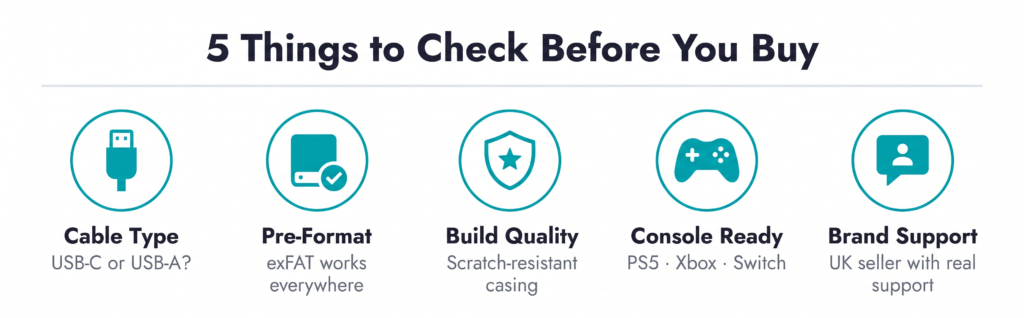
How to choose a cheap external hard drive: five things that actually matter
Before we get into the shortlist, here’s what to weigh up. Most buying guides at this price point obsess over theoretical transfer speeds. That’s not where the real differences lie.
1. Cable compatibility
Check what’s in the box. Some drives still ship with USB-A only, which is a problem if you’re on a modern MacBook or USB-C laptop. Look for drives that include a 2-in-1 cable or bundle both USB-A and USB-C connectivity out of the box. Otherwise, factor in the cost of an adapter.
2. Pre-formatting
Most cheap drives ship formatted for Windows (NTFS) or as exFAT. If you’re a Mac user, NTFS drives will be read-only until you reformat. exFAT is the universal option — it works across Windows, macOS, PS4/PS5, Xbox and most smart TVs out of the box.
3. Build quality vs. form factor
Cheap doesn’t have to mean plasticky. Look at the casing: matte finishes show fewer fingerprints, textured surfaces resist scratches, and anti-slip rubber feet (or bases) prevent the drive skating across your desk when you plug cables in. None of this affects the drive internally, but it affects how the drive ages.
4. Console compatibility
If you’re buying for a PS4, PS5, Xbox One or Xbox Series X/S, check that the drive is explicitly confirmed as compatible. Most 1TB portable HDDs work out of the box for PS4 and Xbox One. For PS5 and Xbox Series X/S, external HDDs can only store PS5/Series games — you’ll still need internal or expansion storage to play them.
5. Brand support
At this price, you’re not buying heritage, you’re buying capacity. But make sure the brand has a responsive UK seller presence, clear returns process, and actual product support listed on the listing. Anonymous white-label drives with no seller name are the riskiest bet at any price.
The shortlist: best external hard drives under £50 in the UK (2026)
Prices verified at time of writing. Amazon UK prices fluctuate, always check the live listing.
1. ModusTech 1TB Portable External Hard Drive (£41.40)
The ModusTech 1TB sits firmly in the under-£50 bracket and holds a strong position in the Amazon UK bestseller rankings for external hard drives. It’s the drive we’d recommend if you want current-generation connectivity without paying a heritage premium.
What you get:
- 1TB of storage in a slim 2.5-inch form factor
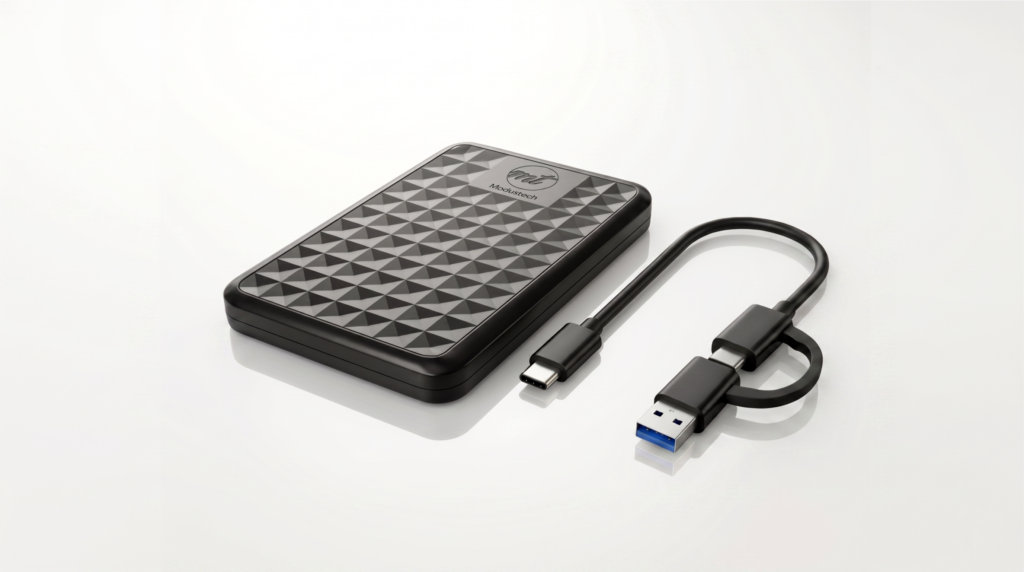
- USB 3.0 / USB-C connectivity via an included 2-in-1 cable — no adapter needed whether you’re on a modern MacBook, a USB-A desktop, or a gaming console
- Plug-and-play setup, pre-formatted and ready for Windows, Mac, PS4, Xbox and smart TVs
- Up to 5Gbps theoretical transfer rate; real-world HDD write speeds up to 100MB/s
- Shock-resistant casing with anti-scratch finish
- Weighs approximately 160g
Where it wins: The 2-in-1 cable is the single biggest quality-of-life upgrade over most budget rivals. Most drives at this price still ship USB-A only, which is an annoyance every time you plug into a modern laptop. ModusTech also leans into cleaner industrial design than the utilitarian WD and Seagate equivalents.
Who it’s for: Students, home users, console gamers and anyone backing up a laptop who wants modern USB-C connectivity without the SSD price tag.
Also consider from ModusTech:
- ModusTech 500GB Portable — if 1TB is more than you need, the 500GB variant drops below £35 and inherits the same 2-in-1 cable, slim casing and console compatibility. A sensible choice for light backup duties or a secondary drive.
- ModusTech 2TB Portable — if you can stretch your budget slightly, the 2TB variant sits around the £50–£60 mark and doubles your capacity for roughly a third more money. A better cost-per-terabyte than buying two 1TB drives separately.
2. WD Elements 1TB Portable (around £40–£50)
The WD Elements is the default recommendation on most buyer’s guides, and for good reason. It’s been around for years, it’s reliable, and Western Digital’s after-sales support is well-established in the UK.
What you get:
- 1TB capacity, USB 3.2 Gen 1 (i.e. USB 3.0) via USB Micro-B to USB-A cable
- Tested and proven on Windows and Mac (reformat required on Mac)
- Compact plastic casing, around 130g
Where it falls short: USB-A cable only. No USB-C out of the box. For Mac users and anyone on a modern laptop, that means either adapter shopping or buying a separate cable. The design has also barely changed in a decade, which shows.
3. Seagate Portable 1TB (around £40–£55)
Seagate’s Portable (sometimes called the Expansion Portable) is the main rival to WD Elements and performs in a similar bracket. Seagate includes a 1-year Rescue Data Recovery Service on some variants, which is a useful differentiator if your drive carries irreplaceable data.
What you get:
- 1TB capacity, USB 3.0 via USB Micro-B to USB-A
- Works with PC, Mac (reformat required), PlayStation and Xbox
- 1-year limited warranty with optional Rescue service on select SKUs
Where it falls short: Same USB-A cable limitation as the WD Elements. Plastic casing that feels noticeably budget compared to higher-tier Seagate drives.
4. Toshiba Canvio Basics 1TB (around £40–£50)
The third of the “big three” budget HDDs on Amazon UK. Toshiba’s Canvio Basics is a straightforward, no-frills portable drive.
What you get:
- 1TB capacity, USB 3.2 Gen 1 via USB Micro-B
- Matte black plastic finish, around 150g
- Plug-and-play on Windows; reformat needed for Mac
Where it falls short: As with WD and Seagate, the cable story is the weak link. No USB-C option in the box, and the Canvio Basics sits at a similar retail price to competitors with more modern connectivity bundled in.
What about SSDs under £50?
Portable SSDs are faster, more durable and smaller than HDDs — but under £50 in the UK, your choices are extremely limited. You’ll typically find 250GB models at this price point, with 500GB SSDs starting closer to £60–£70 and 1TB models comfortably above £80.
The maths is straightforward:
- Under £50, 1TB HDD = best capacity-per-pound. Right choice if you need storage volume.
- Under £50, 256GB SSD = best speed-per-pound. Right choice if you shift small files constantly and value speed over space.
For most people buying under £50 for backup, media storage or console use, a 1TB portable HDD is the better choice. If raw transfer speed matters more than capacity — say, you’re editing 4K video off the drive — it’s worth stretching the budget for an entry-level portable SSD instead.
Frequently asked questions
Is 1TB enough for a cheap external hard drive?
For most people, yes. 1TB holds roughly 250 HD films, 200,000 high-resolution photos, or a full PS4 / Xbox One game library. If you’re backing up a heavily-used laptop with creative files, video projects or large Steam libraries, consider stretching to 2TB.
Will a £50 hard drive work with my PS5 or Xbox Series X?
You can store PS5 and Xbox Series X/S games on a USB HDD like the ModusTech 1TB, but you can’t play them directly from it — next-gen games have to be moved to internal or official expansion storage first. For PS4 and Xbox One games, a USB HDD works as a direct play drive.
Can I use a cheap external hard drive with a MacBook?
Yes, but check the pre-format. NTFS-formatted drives (the Windows default) will be read-only on macOS until reformatted as exFAT or APFS. Drives that ship pre-formatted as exFAT — like the ModusTech range — work on both Mac and Windows immediately, with no setup.
How long do cheap external hard drives last?
A well-treated portable HDD typically lasts 3–5 years of regular use. The two biggest enemies are physical impact (dropping it, especially while spinning) and heat. Treat it reasonably, keep it out of direct sun, and it’ll outlast the laptop you bought it for.
Is it safe to buy a cheap external hard drive from a lesser-known brand?
The risk isn’t the drive mechanism — most budget brands source HDDs from the same handful of manufacturers (Seagate, Toshiba, WD) and assemble them in their own casings. The risk is seller support and returns. Buy from established Amazon sellers with clear brand names, UK fulfillment and visible contact details. ModusTech, for example, ships through Amazon UK fulfilment with direct seller support.
What’s the difference between USB 3.0, USB 3.1 and USB 3.2 Gen 1?
Nothing. They’re all 5Gbps. The naming scheme has been rebranded three times, but the speed hasn’t changed. Any drive advertising any of these is giving you the same interface.
The bottom line
Under £50, you’re not choosing between a great drive and a bad one — you’re choosing between drives that all do roughly the same job, but with small quality-of-life differences that stack up over years of daily use.
If you want the most modern connectivity in the bracket — a proper 2-in-1 USB-C and USB-A cable, plug-and-play on any device you own now or are likely to own next — the ModusTech 1TB Portable is where we’d put our £45. If you need less capacity, the 500GB variant drops under £35. If you want to future-proof with more headroom, the 2TB sits just above £50 and gives you the best cost-per-terabyte in the lineup.
The WD, Seagate and Toshiba drives remain perfectly reliable choices — they’ve been around longer and have the brand recognition to match. But at this price point, the connectivity story matters more than the heritage, and that’s where newer entrants have earned their shelf space.
Whichever you pick, buy from an established seller, check the pre-format, and back up anything that matters twice.